Cloze and image occlusion flashcards: how they work and why they help
Memor More 1.7.0 adds cloze and image occlusion cards. See our hands-on walkthrough, what research says about fill-in-the-blank recall, and the limits.
Memor More 1.7.0 adds two card types. Cloze cards hide words in a sentence, and every blank you make becomes its own card. Image Occlusion does the same for pictures: hide the labels on a diagram, map or textbook page, and each hidden label turns into a card. Both run on the same FSRS schedule as the rest of your deck, on iPhone, iPad and Mac.
Tested 10 October 2026: we used Memor More 1.7.0 on iOS 27.0, on the free plan and without an account. Every screenshot below comes from that test. We didn't try the camera scanner, iPad or Mac. We'd rather show you the misses than a polished demo, so the test notes at the end list what we checked and what we didn't.
What is new in 1.7.0
| Feature | What it does | Where |
|---|---|---|
| Cloze | Select words in a sentence and tap Blank. Each blank, or each group of blanks, becomes one card | iPhone, iPad, Mac |
| Image Occlusion | Scan a page or pick a photo, screenshot or PDF page. Printed labels are found on the device, and each hidden label becomes one card | iPhone, iPad, Mac (Scan a Page on iPhone and iPad only) |
| Suggest blanks | Proposes which words in a sentence to blank, using the on-device model | Devices with Apple Intelligence turned on |
| Anki import | Cloze and image occlusion notes arrive with their blanks, hints, groups and masks | All platforms |
What is a cloze deletion?
A cloze deletion is a true sentence with a piece missing: "Mitochondria make [...] by oxidative phosphorylation." You recall the missing piece, then check it.
The word is older than flashcard apps. Wilson L. Taylor coined "cloze" in 1953 from the Gestalt idea of closure, the habit of completing an unfinished pattern. He used gap-filling to measure how readable a text was, not as a way to memorize anything (Taylor's 1953 paper in Journalism Quarterly).
Spaced-repetition users adopted the format because it turns a sentence from your notes into a question in seconds. Piotr Wozniak, who created SuperMemo, calls cloze deletion "easy and effective" in his twenty rules of formulating knowledge and recommends it to beginners. That's a practitioner's advice, not an experiment, and the experimental evidence turns out to be more mixed.
How to make cloze cards in Memor More
- Open a deck and tap Cloze under Add Card, or touch and hold + and choose Cloze. You can also start a basic card: making a blank on its front converts it, and your back side moves into Extra.
- Type or paste a sentence.
- Select the words you want to hide and tap Blank above the keyboard, or choose Make Blank from the edit menu. On iPad with a keyboard, and on Mac, the shortcut is ⇧⌘C.
- Optionally add a hint for any blank, put notes in Extra (shown after the answer), or use Make Blank on Same Card when two blanks belong in one question.
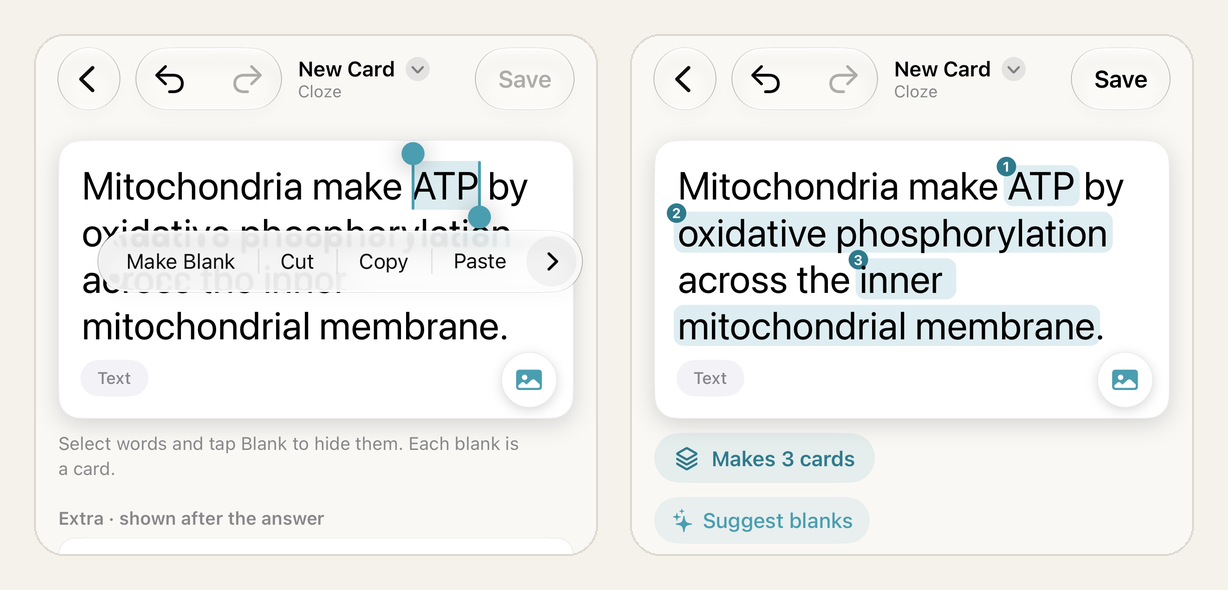
Left: selecting "ATP" and choosing Make Blank. Right: three blanks in one sentence, so the note makes three cards.
In our test, one sentence with three blanks ("ATP", "oxidative phosphorylation" and "inner mitochondrial membrane") produced three cards. Tapping the "Makes 3 cards" chip opens a list of them, where each blank has a hint field and can be dragged onto another card to be asked together. We gave the ATP blank the hint "energy currency".
Editing the sentence later keeps your review progress. Removing a blank deletes that card and its history, and the app asks first if the card has already been reviewed.
Let the device suggest blanks
On a device with Apple Intelligence turned on, a Suggest blanks button appears under the text. We typed "The Golgi apparatus modifies, sorts and packages proteins before they are sent to the cell membrane or lysosomes." It proposed four blanks: Golgi apparatus, proteins, cell membrane and lysosomes. You can untick any of them and choose between separate cards or one card for all. Adding them counts as a single undo step, so a bad batch is one tap to reverse.
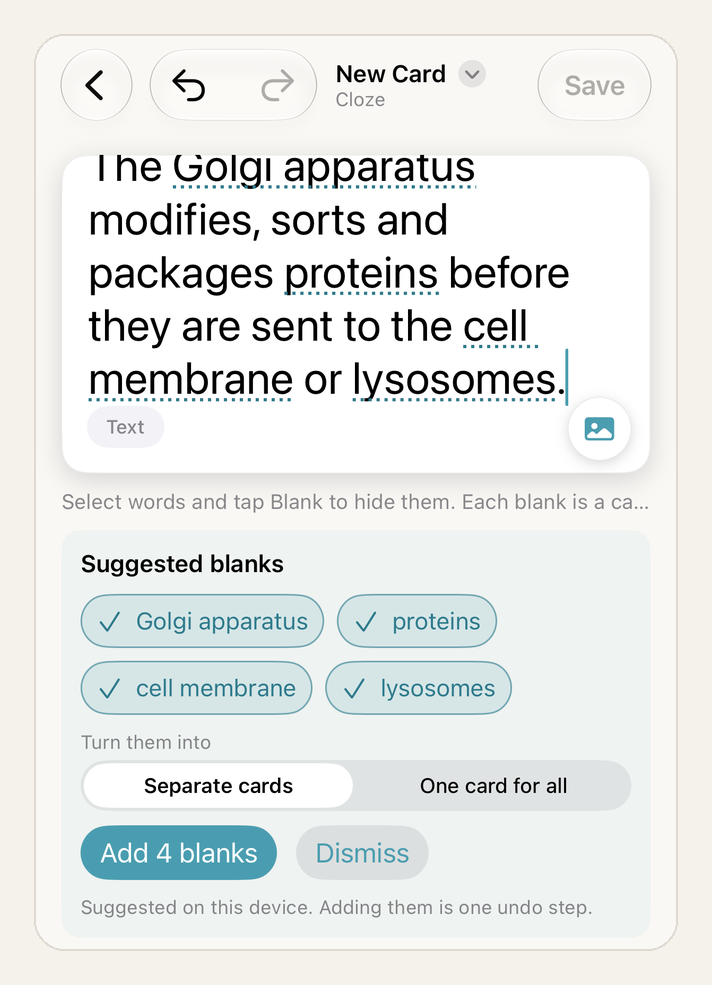
Suggested blanks are generated on the device. Devices without Apple Intelligence don't show the button.
Treat the suggestions as a draft. They picked sensible nouns here, but you know which terms your exam asks for.
What studying a cloze card looks like
The question shows the sentence with a dashed gap, and your hint sits inside it if you added one. Revealing the answer fills the gap where it stands and puts Extra below a divider, then you rate the card as usual. For a new card in our deck (FSRS, 90% target retention), the buttons offered 10 minutes, 15 minutes, 2 days and 8 days. You can read more about how those intervals are calculated in FSRS vs SM-2.
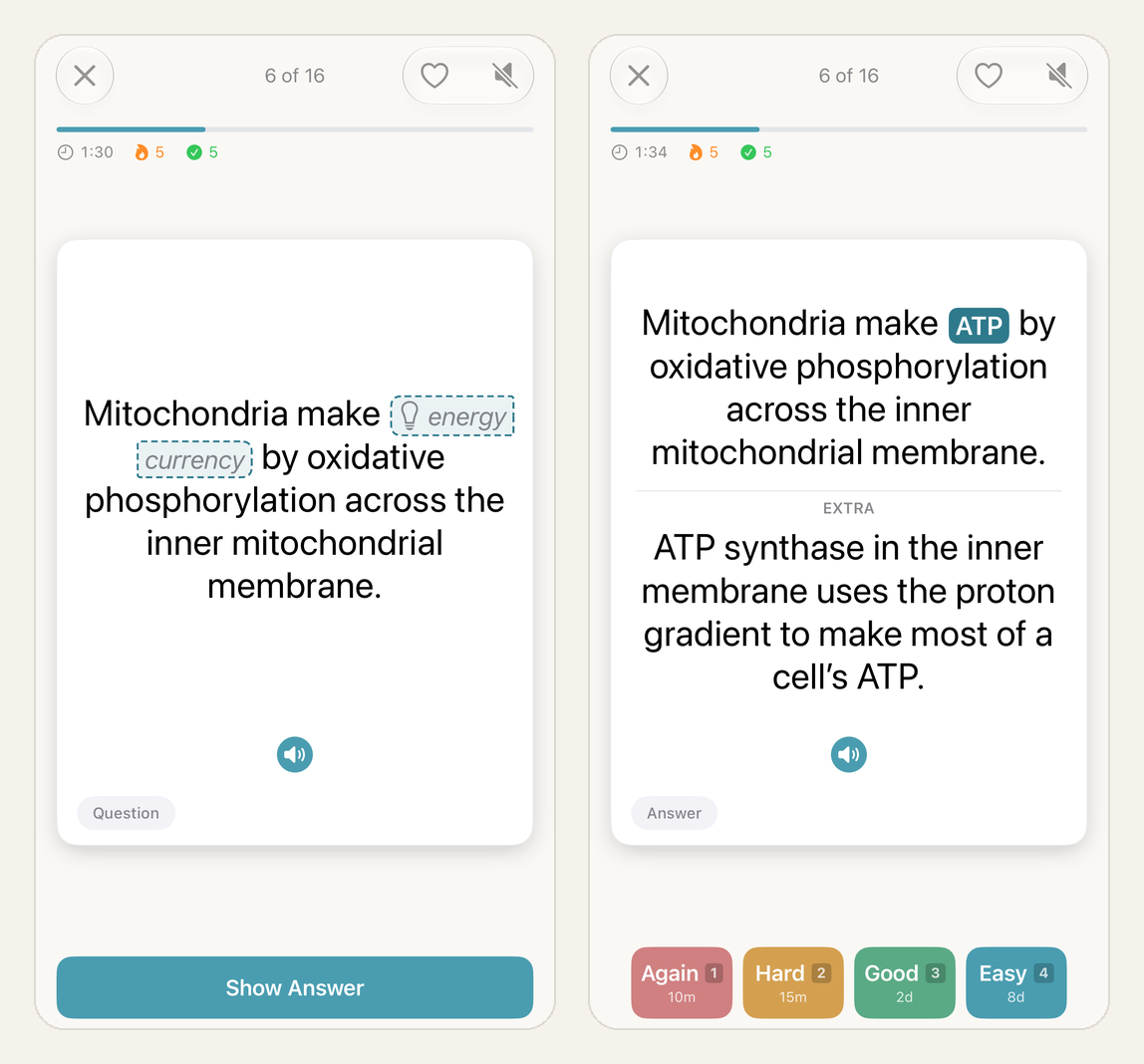
Question with a hint (left) and the answer revealed in place with Extra (right).
Cards made from the same sentence are siblings. When one of them is asked, the other blanks are visible, so meeting two siblings back to back would turn the second one into rereading. Anki can bury siblings until the next day (Anki manual: siblings and burying). Memor More spreads them through the session instead.
We checked the order in a 16-card session made from three notes: the cell diagram (9 cards), the Golgi sentence (4) and the mitochondria sentence (3). For the first eleven cards the notes took turns, so no two siblings were adjacent. The last five cards were all diagram labels, because by then the diagram was the only note with cards left. With more notes in a session, there are more cards to place between siblings.
Does cloze deletion work? What the research says
A cloze card is retrieval practice: you produce the answer before you see it. The case for retrieval practice is strong. The findings on question format and transfer are messier, and they change how you should write the cards. Our active recall guide covers the basics in more depth.
Recalling beats rereading, once a few days pass
In Roediger and Karpicke's experiment with 120 students, those who practised recalling a prose passage remembered 56% of it a week later. Those who reread it remembered 42%. Five minutes after studying, rereading had looked slightly better (Psychological Science, 2006). That early advantage is part of why rereading feels more productive than it is.
It also pays to keep retrieving after you first get something right. Students learning Swahili–English word pairs recalled about 80% a week later when they kept testing themselves. When pairs were dropped from testing after one correct answer, recall fell to 33–36%, even though they kept restudying them (Science, 2008). A 2013 review of ten study techniques gave its top "high utility" rating to only two: practice testing and spacing practice over time (Dunlosky and colleagues).
Typing the answer vs picking it: not settled
A meta-analysis of 159 effect sizes found that practice tests requiring recall produced larger gains than recognition tests (Rowland, 2014). A larger one found multiple-choice practice doing at least as well as short-answer practice (Adesope, Trevisan and Sundararajan, 2017). Feedback may explain part of the split. In one study, short-answer practice beat multiple choice three days later, but only when learners were shown the correct answer afterwards (Kang, McDermott and Roediger, 2007). A cloze card in Memor More always shows you the answer after you respond, which is the condition where recall came out ahead.
Filling a gap is also a small act of generation. Words you produce yourself tend to stick better than words you only read: a meta-analysis of 86 studies put the advantage at about 0.4 standard deviations, and sentence completion was one of the tasks with a larger effect (Bertsch and colleagues, 2007). Reviewing a card you studied before is mostly retrieval, so we count this as a secondary reason rather than the main one.
The catch: you can learn the sentence instead of the idea
In three experiments, fill-in-the-blank practice improved later answers to the same blanks but did nothing for related questions about the same text. More open-ended recall did carry over (Hinze and Wiley, 2011). That is the real weakness of cloze cards, and most of the advice below is about working around it. A meta-analysis of 192 transfer effects found that retrieval practice can help with new questions, but least of all with questions asked in reverse and with material that was seen but never tested (Pan and Rickard, 2018).
What we'd suggest when writing cloze cards:
- Blank the idea, not the filler. Hide the term, number or cause you'll be asked about; blanking "the" or "is" only tests grammar.
- Keep sentences short. Everything around the blank is a cue, and a long sentence with one small gap is easy to recognise without really knowing the answer.
- Give each fact its own blank. Transfer is weakest for material you saw but were never tested on, so a fact that sits visible on every card isn't being practised. Save Make Blank on Same Card for things you'd recall together, like a pair of opposites.
- Write a direct question for anything you need to explain. If the exam asks why mitochondria matter, a basic card that asks why will do more than another blank. Our exam revision guide shows how to mix the two.
- Treat hints as training wheels. Lab studies found that retrieving with fewer cues during practice led to better memory later (Carpenter and DeLosh, 2006), and that hints which fade out worked better than hints that stay (Finley and colleagues, 2011). Delete a hint once the card feels easy.
What is image occlusion?
Image occlusion is cloze for pictures. You cover a label on a diagram, name it, then uncover it. Wozniak's rule 8 puts it plainly: "graphic deletion is as good as cloze deletion" for anatomy, geography and similar material. Again, that is practitioner guidance. Anki made image occlusion a built-in note type in version 23.10, released on 31 October 2023 (Anki 23.10 release notes), with two modes called Hide All, Guess One and Hide One, Guess One (Anki manual).
Memor More offers the same two choices for each picture. Hide all, the default, covers every label and asks for one, so neighbouring labels can't give the answer away. Hide one covers only the label being asked and leaves the rest visible as hints, which can help on a first pass through a crowded diagram.
From a textbook figure to nine cards: our test
We drew an original animal-cell figure, so we could publish it, and made it look like a textbook page: a large title, nine labels with leader lines (one of them wrapped over two lines), and a caption starting "Figure 3.2". We added it from the Photo Library. The other sources are Scan a Page, which straightens photographed pages, Files for images and PDF pages, and Paste.
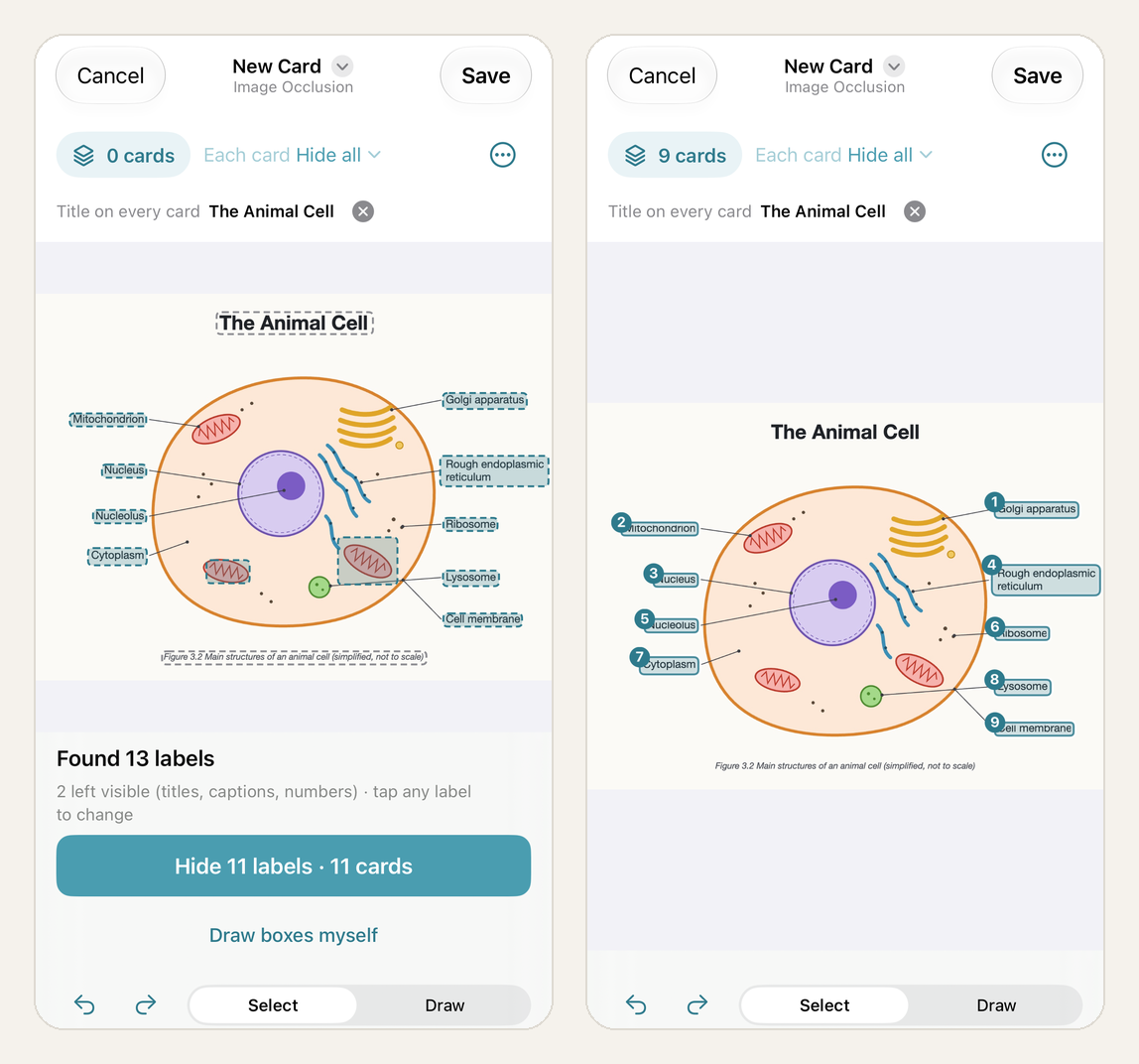
Left: the first detection pass, including two boxes on the mitochondrion drawings. Right: the nine labels hidden after two corrections.
| Detection result | Count |
|---|---|
| Text regions found | 13 |
| Left visible automatically (title and caption) | 2 |
| Real labels proposed for hiding | 9 of 9 |
| False positives proposed for hiding | 2 |
| Taps needed to fix them | 2 |
| Cards created | 9 |
Every real label was found. The title, "The Animal Cell", was left visible and offered as a title to show on every card, and "Rough endoplasmic reticulum", printed over two lines, came through as one label rather than two. The two mistakes came from the drawing, not the labels: text recognition read the zigzag folds inside two mitochondria as "WL" and "WW" and proposed hiding them. Tapping each box switched it back to visible. All nine label names were spelled correctly, and each name becomes the answer for its card, editable in the card list.
This was one clean, printed figure. We did not test handwriting, photos taken at an angle, tiny print or non-Latin labels. Detection only suggests boxes, and "Draw boxes myself" always works, up to 60 boxes per picture. Labels that appear more than once on a picture are asked on one card.
What studying an image occlusion card looks like
Each card opens zoomed in on its target, a box marked with a question mark, with nearby labels covered in grey when you use Hide all. "Whole picture" switches to the full figure, and pinching the picture or tapping the corner button opens it full screen. When you reveal the answer, the label appears in its box and as text below the picture, followed by the usual four rating buttons.
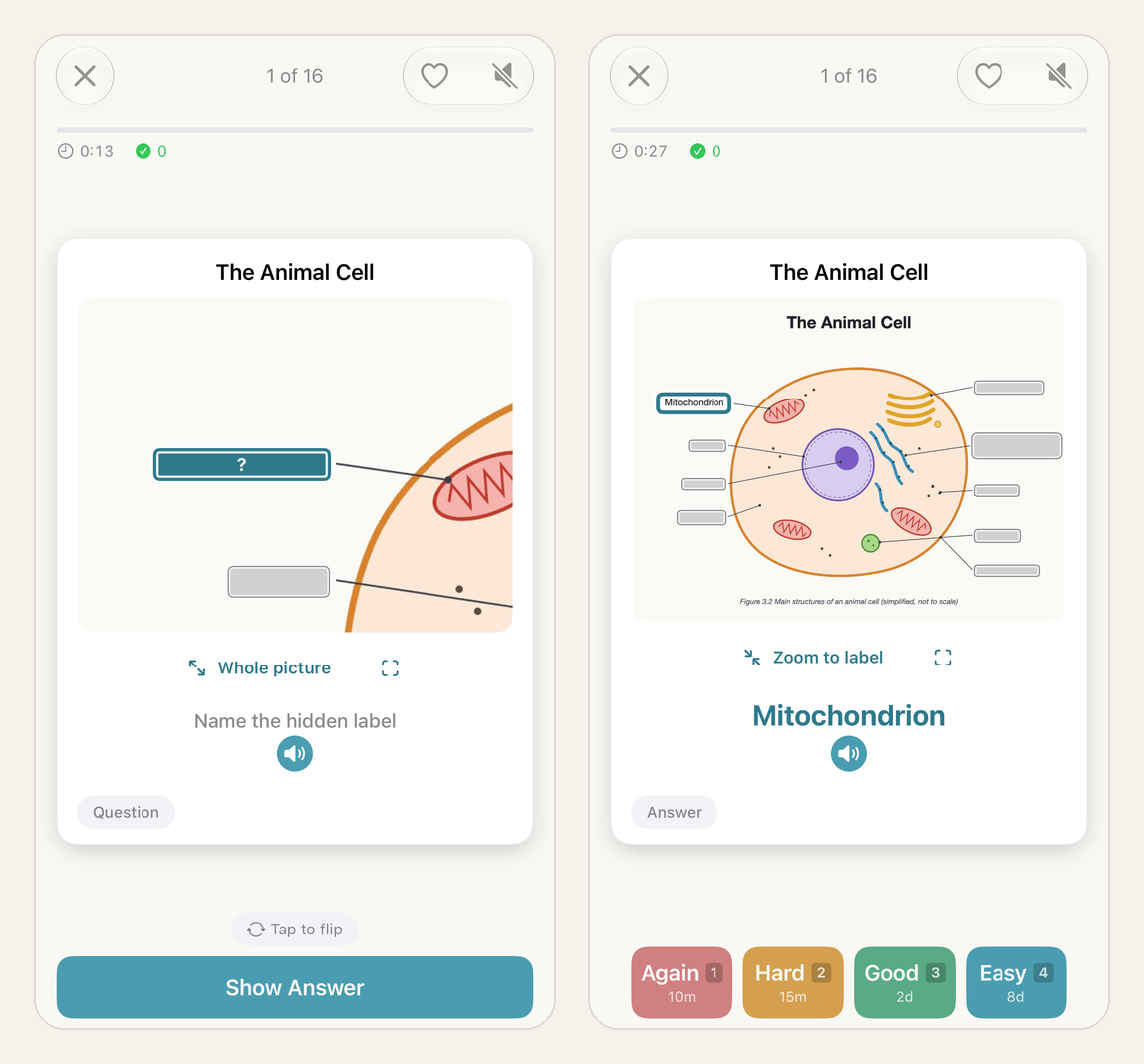
The zoomed question (left) and the revealed answer on the whole picture (right).
The cards also work with VoiceOver. One of our cards was announced as "Picture: The Animal Cell. Hidden label 3 of 9, left side, middle", so a screen-reader user hears where the hidden label sits before answering.
Does image occlusion work? The evidence and its gaps
We looked for a controlled study comparing hidden labels on textbook diagrams with restudying the labelled figure, and didn't find one. The support comes from close relatives of that task.
The nearest is a map study. Fifty students learned maps either by studying them or by repeatedly seeing them with one of 12 features missing and recalling it. Thirty minutes later, the second group drew the maps more accurately: 74% versus 63% correct on one scoring method (Carpenter and Pashler, 2007). Fourth and fifth graders who learned map locations through testing also remembered more the next day, including on harder transfer questions (Rohrer, Taylor and Sholar, 2010).
Anatomy research points the same way, with text rather than pictures. Students learning skeletal muscles recalled the most a week later when they combined retrieval with sessions spread over a week, and the least when everything was crammed into one day (Dobson, Perez and Linderholm, 2017). And meaning seems to matter: testing improved memory for meaningful pictures of objects but not for abstract shapes (Ferreira and Wimber, 2023). A labelled diagram is meaningful by design.
Two results argue for caution. In a randomized study with 40 medical students, one session of naming unlabelled ultrasound structures did no better at one week or one month than viewing labelled images (Potter and colleagues, 2019). Our reading is that a single drill is not enough, and occlusion cards belong on a spaced schedule. And retrieval practice on a city map helped people remember the map itself, but not point or navigate from a different viewpoint (Brunyé and colleagues, 2020). Image occlusion teaches you what sits where on that picture, which is a narrower skill than using the knowledge somewhere else.
One thing image occlusion is not: a technique for "visual learners". A review of the learning-styles research found no adequate evidence for matching teaching to a preferred style (Pashler and colleagues, 2008). Use it for material that is visual by nature, such as anatomy, maps, circuit diagrams and labelled slides.
In practice:
- Keep one figure per note. Crop a page down to the diagram you need, so the zoomed view stays readable.
- Name each label the way you will be asked. The box name is the answer, so write "Rough endoplasmic reticulum" if that is what your exam expects, not "RER".
- Once a diagram feels familiar, use Hide all. Fewer cues during practice tends to mean better memory later.
- Every so often, draw the figure from memory. That is what the map study measured, and it shows whether you know the whole layout or only one label at a time.
For plants and animals, the free Biology: Plants & Vertebrates deck covers the terms, and occlusion cards on your own textbook figures can cover where those structures sit. Geography works the same way: the World Capital Cities deck covers names, and a blank map in Image Occlusion covers locations.
Bringing cloze and occlusion cards over from Anki
Import reads Anki packages in both the older format and the newer format used by recent Anki versions. Cloze notes keep their blanks, hints and groups. Image occlusion notes keep their masks and order, including Anki's ellipse and polygon shapes. An import summary lists how many notes of each kind came in. Anki review history is not carried over, so imported cards start fresh.
We did not import a real Anki deck for this article, so check the import summary after your first import before relying on these details. If you are deciding whether to move, the Anki alternative for iPhone page and our Anki vs Memor More comparison cover the wider trade-offs.
Smarter help while you study
Suggest blanks is part of a wider on-device assistance feature in 1.7.0. The AI assistance section in Settings describes it as "Suggestions while you edit cards, help after a mistake, and a second look at typed answers." It runs on the device with Apple Intelligence and is hidden on devices where Apple Intelligence is not available. For this article we tested only Suggest blanks.
If you want material written for you rather than suggestions, that is a separate feature: the AI flashcard generator turns notes and files into cards online.
Limits worth knowing
- Shared decks don't include image occlusion cards yet. They stay in your own deck, and the share screen tells you so.
- The Home Screen widget shows cloze cards but not image occlusion cards.
- Practice Sets skip image occlusion cards, and cloze cards made from one sentence count once towards the cards a set needs. See Practice exercises for how sets work.
- Scan a Page is on iPhone and iPad. On Mac you add a picture, PDF page or screenshot.
- Suggest blanks needs Apple Intelligence turned on.
- If you study on more than one device, update all of them. Older versions show a cloze card as a plain question and answer, and an image occlusion card as a note asking you to open the latest version. Nothing is lost, but the full card only appears in 1.7.0 or later.
Questions people ask
What is a cloze deletion flashcard?
A cloze deletion card shows a sentence with one part hidden and asks you to recall the missing word or phrase. In Memor More you select the words to hide, and each blank, or each group of blanks you choose to ask together, becomes its own card with its own review schedule.
What is image occlusion?
Image occlusion hides the labels on a picture, such as a diagram, map or slide, and asks you to name what is covered. In Memor More each hidden label becomes a separate card. Printed labels are detected on your device, so you can hide them all at once and then correct the selection.
What is the difference between Hide all and Hide one?
With Hide all, every label on the picture is covered and one is asked, so neighbouring labels cannot give the answer away. With Hide one, only the asked label is covered and the others stay visible as hints. Hide all is the default and the harder of the two.
Does cloze deletion actually work?
Cloze cards are a form of retrieval practice, which research links to better long-term retention than rereading. The main risk is learning the sentence instead of the idea: one study found fill-in-the-blank practice helped the exact blanks practised but not related questions. Keep blanks meaningful and add direct questions for concepts you need to explain.
Can I import Anki cloze and image occlusion notes?
Yes. Memor More 1.7.0 imports Anki cloze notes with their blanks, hints and groups, and image occlusion notes with their masks, from both older and current .apkg exports. Anki review history is not carried over, so imported cards start fresh.
Will cards from the same sentence or diagram appear back to back?
Memor More spreads cards from the same note through a study session, so cards from other notes sit between them where possible. In our test with three notes, no two cards from the same note appeared in a row until the diagram was the only note with cards left.
Test notes
- Version: Memor More 1.7.0, tested on 10 October 2026.
- Setup: iOS 27.0 with Apple Intelligence turned on. Free plan, not signed in.
- Deck: a new deck using FSRS with a 90% target retention. Two cloze notes (3 and 4 blanks) and one image occlusion note (9 labels) made 16 cards. All 16 were reviewed once and rated Good, and all came back due in two days.
- Not tested: the camera scanner, iPad and Mac, handwriting, and importing a real Anki deck.
Try it
Memor More is free on iPhone, iPad and Mac. A good first test is small: one cloze note from a sentence in your own notes, and one image occlusion note from a figure you need for an exam. Review them when they come due and see which kind of card you reach for next.
Related guides
- What is active recall?: the retrieval habit both card types train
- Spaced repetition: what the research shows: why the schedule matters as much as the card
- Flashcards for exam revision: when to use cloze and when to write a direct question
- How to turn notes into flashcards: a worked example from notes to an edited deck
- FSRS vs SM-2: how Memor More decides when a card comes back
Written by
Founder & developer of Memor More. I build iOS and Mac apps and write about the science of memory and learning. @Jerelii on X