
How to turn notes into flashcards: a worked example and review checklist
Prepare notes that generate clean cards, fix vague fronts, overloaded answers and duplicates, worked through on one lecture page with an 8-point checklist.
24-second PDF-to-deck walkthrough
This captioned screen recording comes from our 9 September 2026 test in the iOS app. A one-page lecture PDF produced 18 editable cards; we then rewrote one card's front and saved it.
Read the transcript
- Select a one-page neuroscience lecture PDF in From File mode.
- Start generation in Definitions mode and wait for processing to finish.
- Review the preview showing all 18 generated cards before creating the deck.
- Open a saved card, rewrite its front, and save the correction.
Write each line of your notes so it makes one claim, export the page as a PDF, generate, then spend five minutes reviewing before you study anything. That last step is the one people skip, and it is the one that decides whether the deck is worth having.
This guide follows one page of neuroscience lecture notes through that process: what Memor More 1.3.3 generated from it on 9 September 2026, which cards were fine, which needed work, and why. The complete 18-card output, timings and the list of tested file formats are on the AI flashcard generator page. This page is about the method, so you can apply it to your own notes.
The notes we started with
A single page of lecture notes on the action potential, written the way a tidy student would write them: a heading per stage, a bullet per fact, and no abbreviation left undefined.
Resting state
- Resting membrane potential: about -70 mV, with the inside of the neuron negative relative to the outside.
- The sodium-potassium pump maintains the gradient using ATP, moving 3 Na+ out for every 2 K+ in.
Triggering
- Threshold: about -55 mV. Depolarisation that reaches threshold triggers an action potential.
- All-or-none principle: the neuron either fires a full action potential or does not fire at all.
The spike
- Depolarisation: voltage-gated sodium channels open, Na+ flows in, the membrane potential peaks near +30 to +40 mV.
- Repolarisation: sodium channels close, voltage-gated potassium channels open, K+ flows out.
- Hyperpolarisation: the membrane briefly falls below the resting potential before returning to -70 mV.
Refractory periods
- Absolute refractory period: no stimulus can trigger another action potential.
- Relative refractory period: a stronger than normal stimulus is required.
Conduction speed
- Myelinated axons conduct faster because the signal jumps between nodes of Ranvier (saltatory conduction).
- Larger axon diameter also increases conduction speed.
Synaptic transmission
- Ca2+ enters the axon terminal, vesicles fuse with the membrane and release neurotransmitter into the synaptic cleft.
- Neurotransmitter binds receptors on the postsynaptic cell, then is cleared by reuptake or enzymatic breakdown.
That is 216 words under six headings, saved as a one-page PDF. Notice what the page already does well: each bullet carries one fact, every abbreviation is spelled out, and each number sits next to the term it describes. Most of the preparation advice later in this guide is about getting your own notes into that shape.
Save the page as a PDF or DOCX rather than plain text. The format notes further down explain why.
What the generator gave back
We used From File mode with the Definitions option. About 13 seconds later the preview offered 18 cards under the suggested title Action Potential Basics. The draft stays in an unsaved preview, so you can regenerate the whole set or start editing before anything reaches your library.
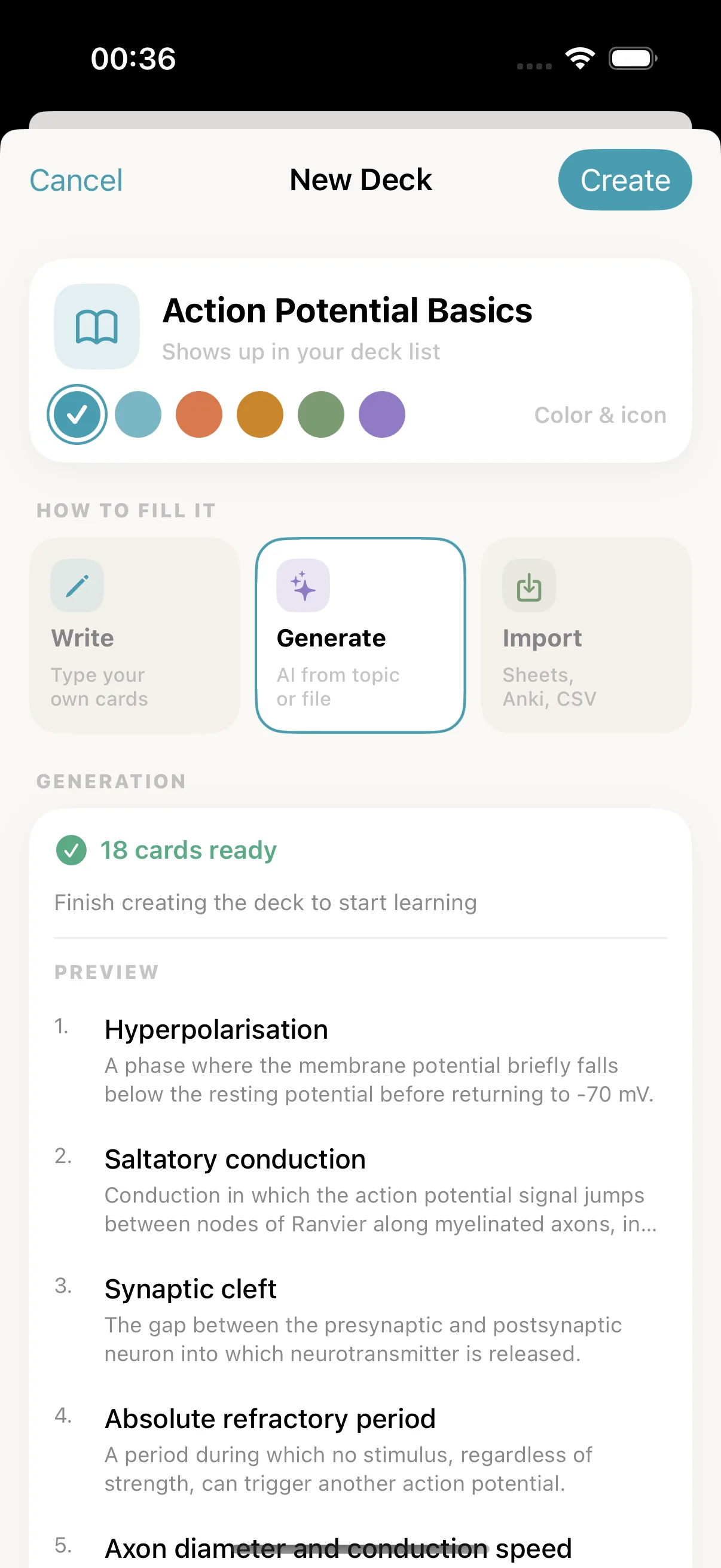
The unsaved preview after one PDF upload.
In the saved deck, 17 cards are exactly as generated and one front was rewritten. The review pass below explains that edit and the other changes we would make before studying. Every card, before and after, is listed in the sample output on the generator page, and you can study the result as the public Action Potential Basics deck.
For learning how to review, the full list matters less than the three kinds of card it contained:
- Clean term cards. Where a bullet gave a term and its definition on one line, the front came back as that term:
Resting membrane potential,All-or-none principle,Threshold (in neuron firing). These needed nothing. - Topic-label fronts. Where a bullet opened with a topic rather than a term, the front became a label:
Role of Ca2+ in synaptic transmission,Axon diameter and conduction speed. - Overloaded answers. Where one bullet packed several facts, so did the back.
Depolarisationcarries the channel, the ion and the peak voltage in a single answer.
Every saved card traced back to a statement on the page, down to the ratios and voltages. Don't expect the cards to follow the order of your notes, though. The deck comes back shuffled, so judge each card on its own.
The review pass
Four things needed attention. One was actually fixed and saved during the test. The other three are recommendations, not edits we pretend were performed.
1. Fronts that read like headings. The card Role of Ca2+ in synaptic transmission is a topic label, not a prompt. Nothing about it tells you what you are being asked to retrieve. What does Ca2+ do at the axon terminal? is the same card doing actual work. The same applies to Axon diameter and conduction speed, which becomes How does axon diameter affect conduction speed?.
This happens because a definitions-mode generation is trying to name the concept a paragraph is about. Where your notes give a clean term, it produces a clean term. Where your notes give a topic sentence, it produces a topic.
2. The card we actually rewrote. We opened Nodes of Ranvier and changed the front to What are the nodes of Ranvier?, then saved. The change held: the saved deck shows the new wording.
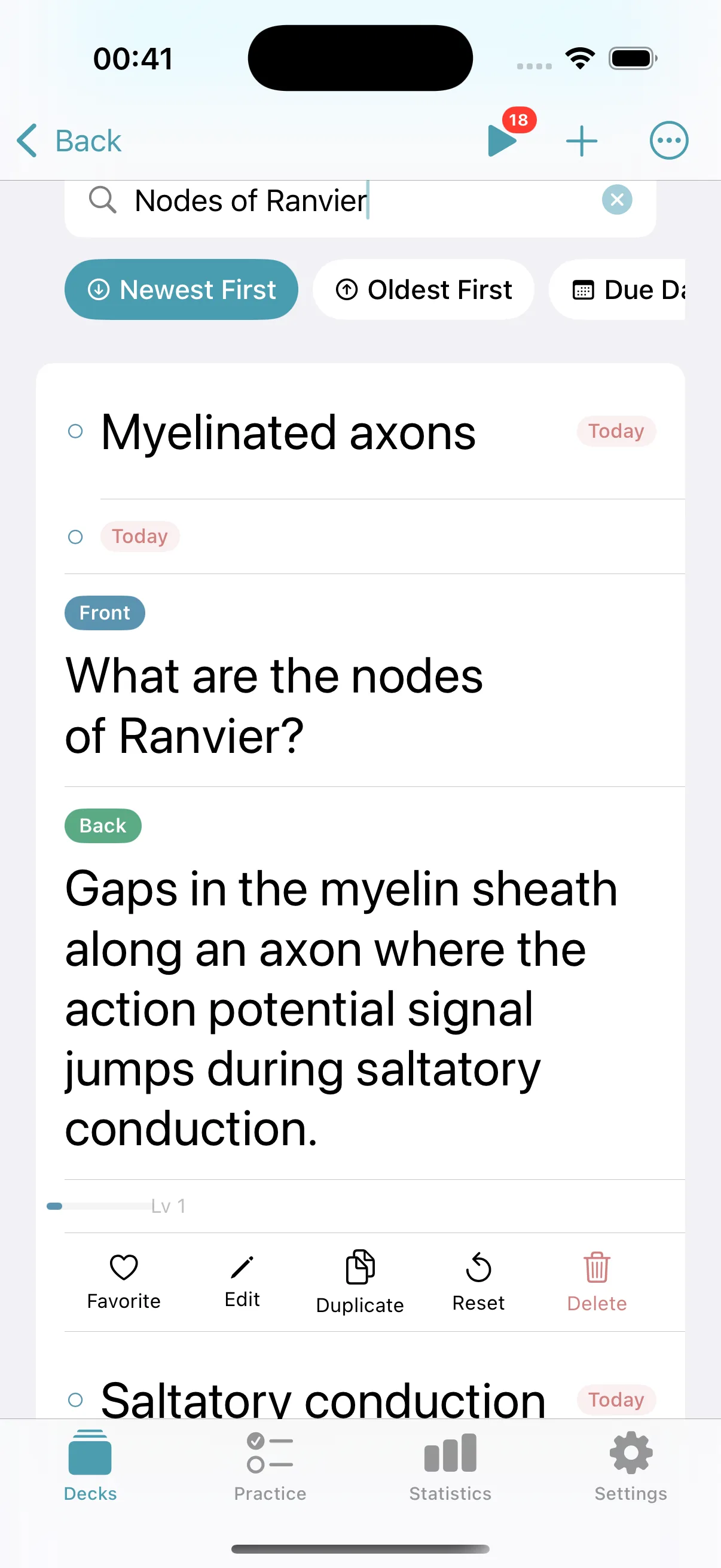
The rewritten front after saving. This was the only edit made during the test.
3. A near-duplicate pair. Repolarisation and Voltage-gated potassium channels describe the same event from two angles. Neither is wrong. Keeping both means answering the same thing twice a day forever, so either cut one or narrow the potassium-channel card to the mechanism alone.
4. Answers that run long. Depolarisation carries three facts: which channels open, which ion moves, and where the potential peaks. That is three retrievals hiding in one card, and it is the classic reason a card feels impossible when it is really just overloaded. Splitting it costs thirty seconds. The reasoning behind this is covered in flashcards for exam revision, which goes into the minimum information principle in more detail.
Here are the same decisions in one table. Only the first was carried out during the test; the others are what we would change before studying.
| Saved card(s) | Review decision | Test status |
|---|---|---|
Nodes of Ranvier |
Rewritten as What are the nodes of Ranvier? |
Made and saved |
Role of Ca2+ in synaptic transmission |
Rewrite as What does Ca2+ do at the axon terminal? |
Recommended, not performed |
Axon diameter and conduction speed |
Rewrite as How does axon diameter affect conduction speed? |
Recommended, not performed |
Repolarisation + Voltage-gated potassium channels |
Delete one or narrow the mechanism card | Recommended, not performed |
Depolarisation |
Split the channel, ion-flow and peak-potential facts if recall is difficult | Recommended, not performed |
No card was deleted as factually wrong during the test. That is a result from one short, tidy PDF, not a general accuracy guarantee.
Writing notes that generate well
Once you have seen what this generator run did with a page, a few practical preparation rules emerge. The recommendations below combine the observed output with retrieval-practice evidence and established card-formulation guidance; the separate DOCX and PNG runs test format paths, not every possible note style.
One claim per line. A bullet that contains a definition, an example and an exception can become one overloaded card. Keeping the testable unit small follows SuperMemo author Piotr Wozniak's practical minimum information principle. It is influential formulation guidance, not a controlled trial of Memor More.
Define the term in the same line you use it. "Threshold: about -55 mV" generates a good card. "Threshold — see diagram" generates nothing useful, because the diagram is not in the text.
Expand each abbreviation once. If the page says "NT" throughout and never says "neurotransmitter", you get cards about NT.
Keep the document focused. The app's own guidance is that a few dozen pages works much better than hundreds, and that matches how the server handles a long upload: it samples across the document rather than reading every paragraph. One chapter or one lecture at a time.
Do not lean on layout. Colour, indentation and the fact that something is boxed do not survive text extraction. If a point is important, say so in words.
Keep open questions out of the file. A line like "??? ask in tutorial" is an instruction to yourself, not material to memorise. Strip it before you upload, or you are inviting a card built on something you do not yet know.
Format details that will trip you up
- Plain text was refused. The app listed TXT as accepted but rejected our
.txtfile. Save plain-text notes as DOCX or PDF first. - Messy notes can still work. That same rejected file held 159 words of fragments, shorthand and uneven headings. Exported to DOCX with no wording changes, it produced 15 cards, and all 15 were kept after review.
- A photo of notes can work too. One realistic 1200×1600 PNG of water-cycle class notes, with coloured annotations and uneven alignment, produced five accurate cards. One image is not proof that every photo or handwriting style will read as cleanly.
- HEIC is not accepted. Convert an iPhone HEIC photo to JPEG or PNG before uploading.
- One file, up to 20 MB. There is no multi-file upload, so combine pages into a single PDF.
- Scanned PDFs were not tested. They are read as images rather than as text, so check that output with extra care.
What the app will not do for you
Being clear about the boundaries saves you looking for features that are not there.
The generator does not produce cloze cards. Its cards have a front and a back. Memor More 1.7.0 added a separate Cloze card type: select words in a sentence from your notes and tap Blank, and each blank becomes its own card. Separately, the Practice feature builds fill-in-the-blank and multiple-choice exercises out of a finished deck.
There is no automatic reverse card. To study a pair in both directions, duplicate the card and swap the two sides by hand.
Generation runs in the native app on iPhone, iPad and Mac and needs an account and a connection. Free accounts get 2 AI generations a week and Premium gets 200, with the count resetting every Monday at 00:00 UTC; a failed run is not counted. Version 1.6.0 still labels the counter “this month”, but the allowance is weekly (checked 12 October 2026). The generator page lists which formats completed a full test and what happens to uploaded files, and the pricing page covers Premium.
The card-quality checklist
Run this once over any generated deck before the first review session.
- Does each front read as a question or a bare term, rather than a heading?
- Could two different answers both be correct for this front? If so, make the front more specific.
- Is every number, date and definition the same as in the source you uploaded?
- Does any answer contain more than one fact? Split it.
- Are there two cards asking essentially the same thing? Cut one.
- Is there a card whose answer you would accept as vague if a marker read it back to you?
- Does the deck name say what it is in three months' time, not just what the file was called?
- Have you deleted the cards you already know cold? They cost review time and teach nothing.
Eight questions, about five minutes for a 20-card deck. It is the highest-value part of the whole workflow, because the alternative is drilling a badly-shaped card daily for a month.
Then let the schedule do its work
A reviewed deck is worth much more than a bigger unreviewed one. Once the cards are in reasonable shape, retrieve the answer before revealing it, check feedback against the source, and let the intervals spread out. Repeated retrieval improved delayed recall in Karpicke and Roediger's 2008 Science experiment, while a major review rated practice testing and distributed practice as high-utility techniques (Dunlosky et al., 2013). Those studies support the study method, not the accuracy of AI-generated cards. See also what the research shows about spaced repetition and what active recall actually is.
The example here is first-year neuroscience. If most of your course looks like this, Memor More for medical students covers keeping up with cards lecture by lecture. You can also browse free public decks, and Memor More for students covers how the daily routine fits around a syllabus.
Start with one focused lecture. Generate, review every card against the source, and keep the first attempt small enough that you can correct it properly.
Download Memor More on the App Store to try the native generator. Use material you are permitted to share and avoid personal, sensitive or confidential information; uploads are cloud-processed through Memor More and a third-party AI provider.
Adapt the workflow for vocabulary
For language notes, use the vocabulary routine and card template to separate reading, listening and production prompts, then adjust new-card intake to your review workload.
Written by
Founder & developer of Memor More. I build iOS and Mac apps and write about the science of memory and learning. @Jerelii on X