
AI flashcard generator
Turn a focused PDF into flashcards you can edit
Upload a focused PDF in the native app. Memor More writes question-and-answer cards from the document and puts them in a preview you can rewrite, cut or regenerate before the deck is saved.
In our 9 September 2026 test, a one-page, 216-word lecture handout produced 18 cards, with the preview visible within 13 seconds. The complete saved set appears below, including the one front we edited. Separate messy-DOCX and realistic-PNG runs also completed and saved.
AI generation runs in the app for iPhone, iPad and Mac. A free account includes 2 AI generations a week, and the count resets every Monday at 00:00 UTC.
No iPhone, iPad or Mac?
The AI generator isn't in the browser app yet. You can still build and study decks there on a Windows PC, a Chromebook or a phone, without an account.
Works in the browser
- Type your own cards into a new deck and study them.
- Import from CSV or TSV, a public Google Sheet, a Quizlet text export, a Notion CSV export, or Markdown/TXT with Q: and A: lines.
- Open a deck someone shared with you by pasting its code or link.
- Add any public deck to your library, including the 18-card sample from the test on this page.
Needs the Apple app for now
- Generate cards with AI from a file or a topic. The browser app marks this "Soon".
- Practice sets and custom study sessions.
- Sync between devices. Decks live in that one browser with no account, so export a backup file before you switch computers.
What was tested, and what was only accepted
Upload acceptance is not the same as successful extraction and useful cards. PDF, messy DOCX and realistic PNG each completed generate → preview → save on 9 September 2026; the PDF run also completed a card edit and save.
| Input | Status | What happens to it |
|---|---|---|
| End-to-end test passed | A one-page, 216-word PDF with a text layer produced 18 cards; preview appeared within 13 seconds. | |
| Word (DOCX) | End-to-end test passed | A 159-word messy DOCX produced 15 cards; all were retained after review. |
| Images — PNG tested; JPEG, WebP, GIF listed | PNG end-to-end test passed | A realistic imperfect PNG produced 5 accurate cards. Equivalent JPEG, WebP and GIF runs were not completed. |
| Plain text — TXT, MD | Accepted now; not retested | The app refused our TXT file in September. The same messy notes saved as DOCX produced 15 cards. Plain text and Markdown uploads are accepted now, but we have not rerun that test. |
One file per generation, up to 20 MB. HEIC photos are refused; convert them to JPEG or PNG first.
Two ways to generate
From a file
Pick Definitions to pull terms and their meanings out of a handout, or Vocabulary to pull lexical items and translate them into a language you choose. The deck name is suggested from the document.
From a description
Describe the deck instead of uploading anything: a topic or free-text prompt, the language for each side of the card, a CEFR level for language decks, and how many cards you want — anywhere from 5 to 100.
24-second PDF-to-deck walkthrough
This captioned screen recording comes from our 9 September 2026 test in the iOS app. A one-page lecture PDF produced 18 editable cards; we then rewrote one card's front and saved it.
Read the transcript
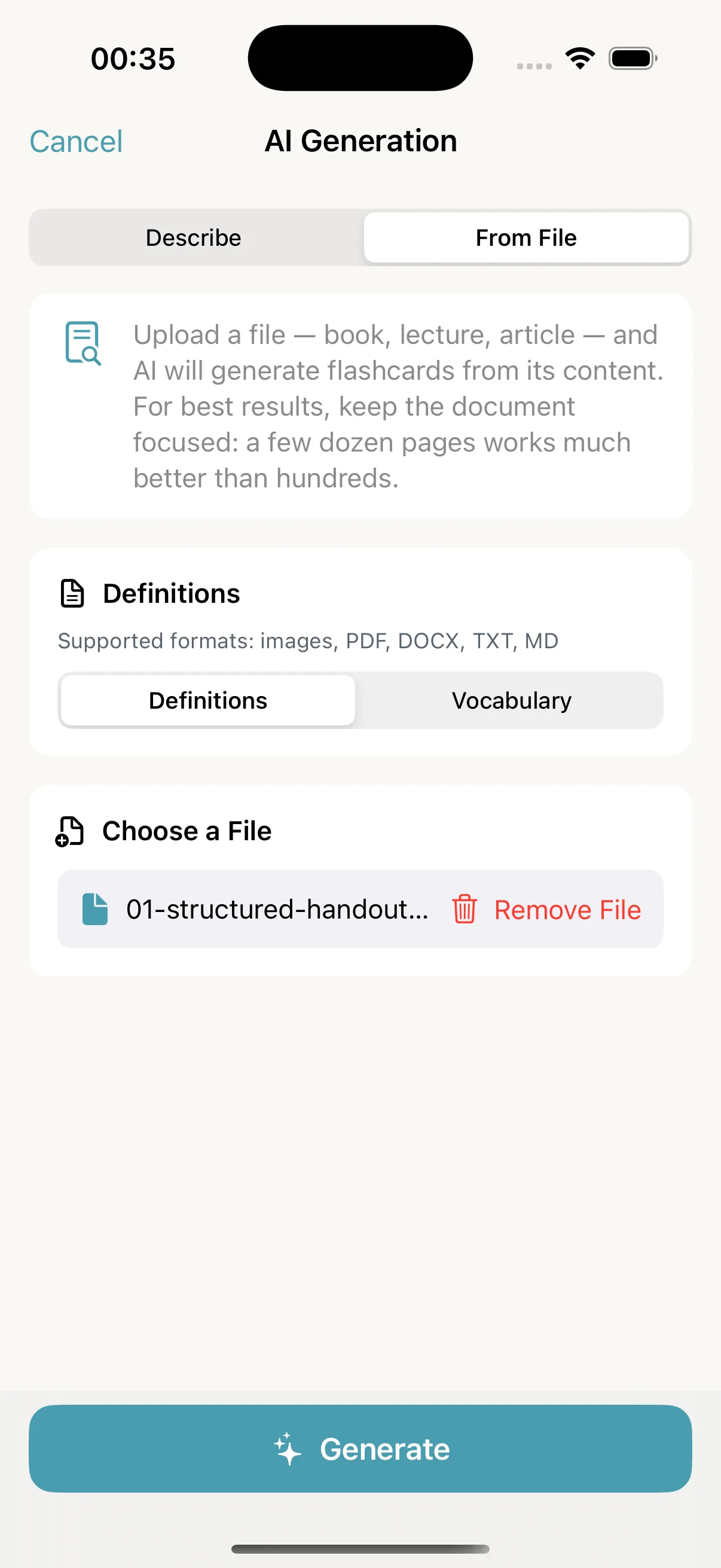
- Select a one-page neuroscience lecture PDF in From File mode.
- Start generation in Definitions mode and wait for processing to finish.
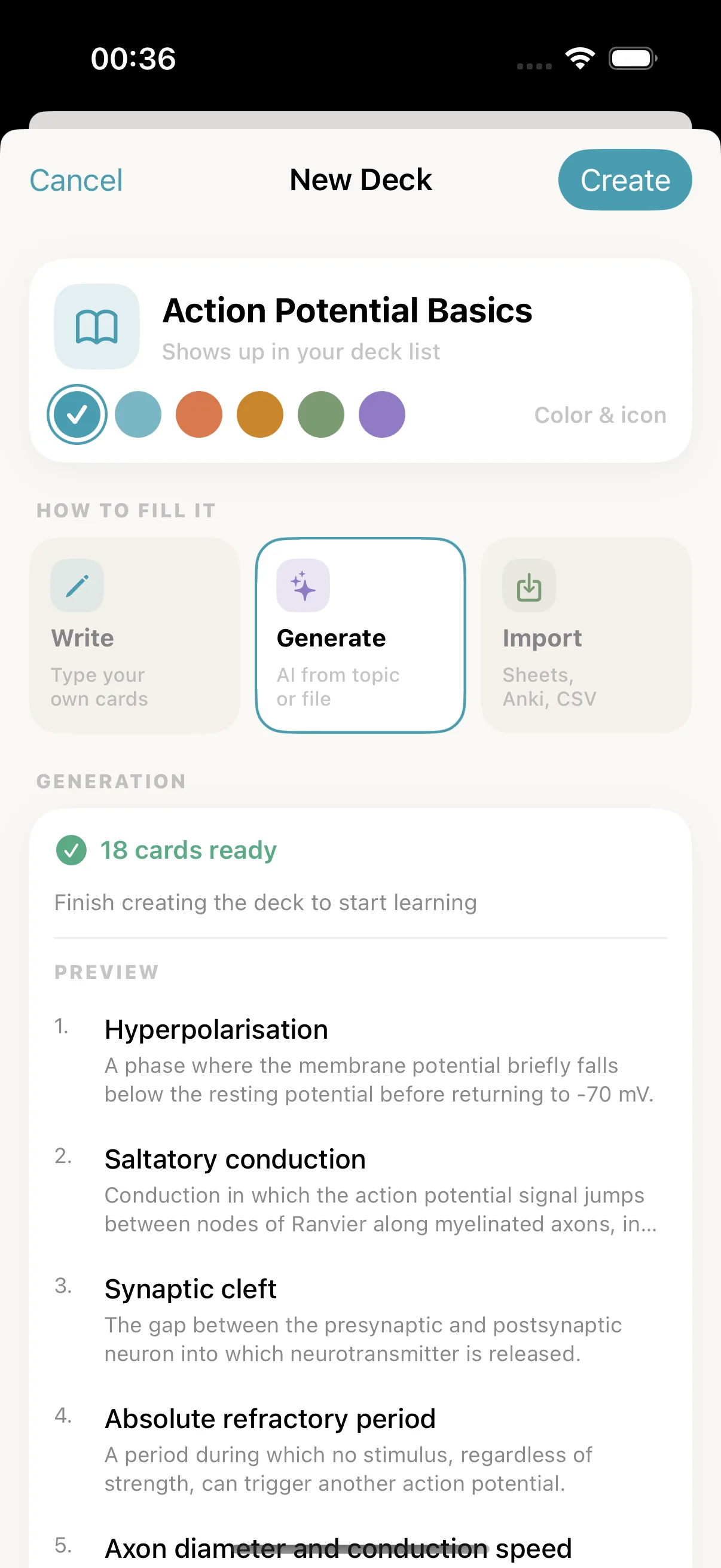
- Review the preview showing all 18 generated cards before creating the deck.
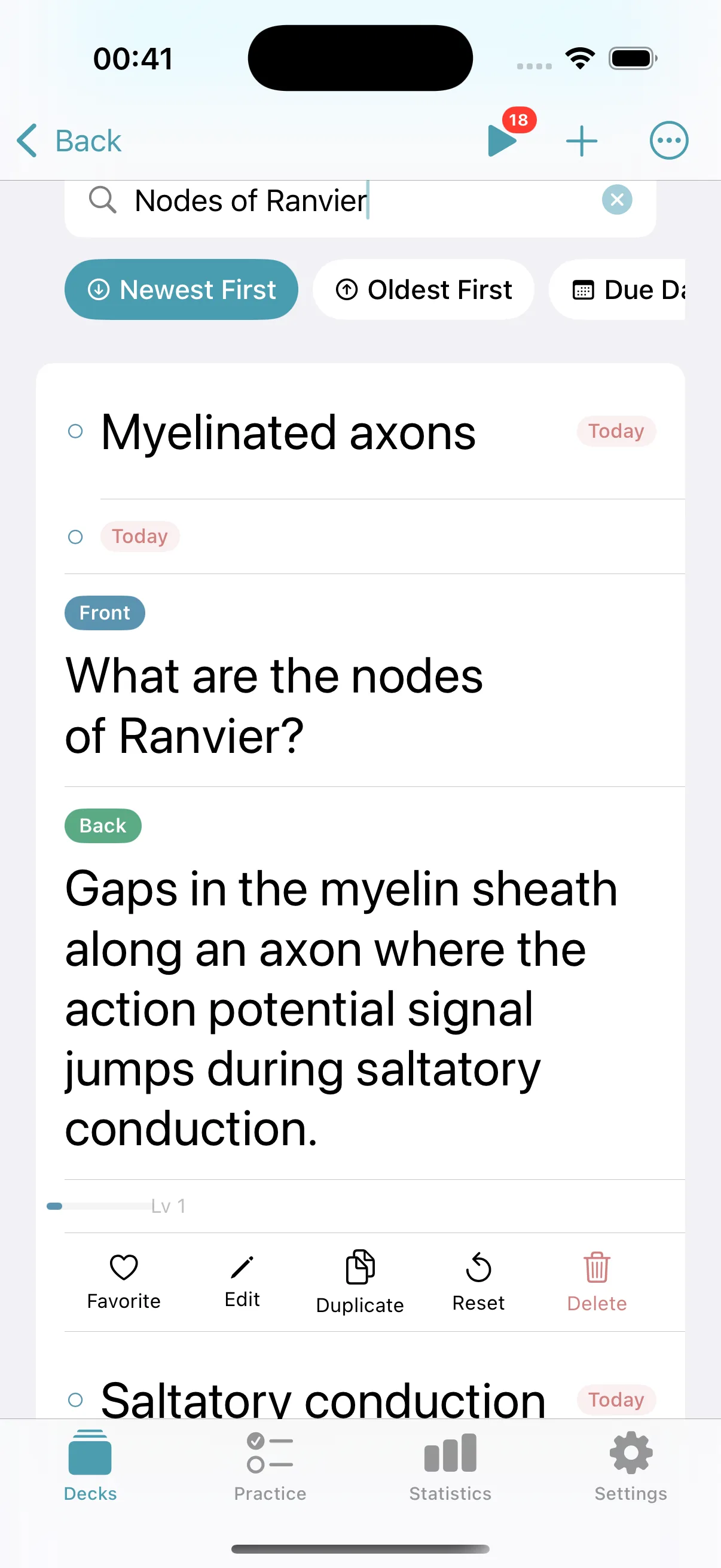
- Open a saved card, rewrite its front, and save the correction.
What the workflow actually looks like
Three screens from the 9 September run described above, recorded in version 1.3.3. Later versions may look slightly different. Nothing is saved to your library until you tap Create Deck.
The complete saved set, including the one card we edited
This is the full saved set from that run: 17 generated cards kept as written, plus “What are the nodes of Ranvier?”, which the AI first wrote as “Nodes of Ranvier”.
Cards are sorted alphabetically here to make them easier to compare. The app's preview showed them in a different order.
| Front | Back |
|---|---|
| Absolute refractory period | A period during which no stimulus, regardless of strength, can trigger another action potential. |
| All-or-none principle | The principle that a neuron either fires a full action potential or does not fire at all, with no partial firing. |
| Axon diameter and conduction speed | Larger axon diameter increases the conduction speed of action potentials. |
| Depolarisation | The phase of the action potential where voltage-gated sodium channels open, Na+ flows into the cell, and membrane potential peaks near +30 to +40 mV. |
| Hyperpolarisation | A phase where the membrane potential briefly falls below the resting potential before returning to -70 mV. |
| Myelinated axons | Axons that conduct action potentials faster than unmyelinated axons due to saltatory conduction between nodes of Ranvier. |
| Neurotransmitter clearance | Neurotransmitter is cleared from the synaptic cleft by reuptake or enzymatic breakdown after binding to postsynaptic receptors. |
| Relative refractory period | A period during which a stronger than normal stimulus is required to trigger another action potential. |
| Repolarisation | The phase where sodium channels close, voltage-gated potassium channels open, and K+ flows out of the cell, bringing the membrane potential back down. |
| Resting membrane potential | About -70 mV, with the inside of the neuron negative relative to the outside. |
| Role of Ca2+ in synaptic transmission | Ca2+ enters the axon terminal, causing vesicles to fuse with the membrane and release neurotransmitter into the synaptic cleft. |
| Saltatory conduction | Conduction in which the action potential signal jumps between nodes of Ranvier along myelinated axons, increasing conduction speed. |
| Sodium-potassium pump | A protein that maintains the ion gradient using ATP, moving 3 Na+ out of the cell for every 2 K+ it moves in. |
| Synaptic cleft | The gap between the presynaptic and postsynaptic neuron into which neurotransmitter is released. |
| Threshold (in neuron firing) | About -55 mV; depolarisation that reaches this level triggers an action potential. |
| Voltage-gated potassium channels | Channels that open during repolarisation, allowing K+ to flow out of the neuron and restore the membrane potential toward resting levels. |
| Voltage-gated sodium channels | Channels that open during depolarisation, allowing Na+ to flow into the neuron and drive the membrane potential upward. |
| What are the nodes of Ranvier? | Gaps in the myelin sheath along an axon where the action potential signal jumps during saltatory conduction. |
The step-by-step version of this run — the original notes, which cards we kept, which we rewrote and why — is in how to turn notes into flashcards.
You can also preview the complete reviewed output as a public Neuro Lecture sample deck.
Review before you study
Five minutes here saves weeks of drilling a card that was subtly wrong.
- 1Read every front on its own. If it reads like a heading rather than a question or a term, rewrite it.
- 2Check any number, date or definition against the source you uploaded. The model works from your document, but it can still compress a nuance out of a sentence.
- 3Check overlapping prompts. Keep both only when they test meaningfully different recall targets.
- 4Split answers longer than about two lines into separate cards.
- 5Fix the deck name. The suggested name comes from the document, not from how you file your subjects.
What it costs
A free account includes 2 AI generations a week. Premium, sold as Monthly Pro or Yearly Pro, raises that to 200 a week. Both reset every Monday at 00:00 UTC. Only successful runs count: if a generation fails, it is not taken from your allowance. In version 1.6.0 the counter under the generator still says “this month”, but the reset is weekly. Checked 12 October 2026.
In our September test each successful run used one generation. The free allowance was three a week at that time, so the counter went from 0 of 3 to 3 of 3 and the app blocked a fourth attempt.
Compare the current subscription periods, trial and storefront caveats on the Memor More pricing page.
Where your file goes
Generation happens in the cloud. Memor More's server receives your file, holds it in memory for the request instead of saving it as a file, and sends its content to Anthropic's Claude model to write the cards. The cards then come back to the app on your device.
Anthropic's standard API documentation says inputs and outputs are deleted within 30 days, with some stated exceptions. Even so, do not upload personal, sensitive, confidential or third-party material you are not permitted to share. Read the Memor More privacy policy and Anthropic's API retention documentation.
Where it falls short
- Generation needs an account and a connection. It runs in the full native app on iPhone, iPad and Mac — not in the browser app.
- Very long PDFs are sampled page by page rather than read in full. A focused chapter or lecture is the safer input.
- PDF, DOCX and PNG each completed one end-to-end run. That does not establish equivalent quality for scanned PDFs, handwriting, JPEG, WebP or GIF.
- Generated cards are a draft. This test needed one cue rewrite; preserve and review the source rather than treating output as authoritative.
- HEIC photos are refused, so convert them to JPEG or PNG first. Plain text and Markdown are accepted now, but we have not repeated the full test with them since the September run, when the app refused TXT.
- If your material is already someone else's well-made deck, browsing the public decks is faster than generating your own.
Frequently asked questions
- What files can Memor More turn into flashcards?
- PDF, Word (DOCX) and a realistic PNG each went from upload to a saved deck in our 9 September 2026 test, and we edited and re-saved the PDF deck. The app also accepts JPEG, WebP, GIF, plain text (TXT) and Markdown, but we have not run full tests with those formats. HEIC photos are refused, so convert them to JPEG or PNG first.
- Can it make flashcards from a PDF?
- Yes. On 9 September 2026 a one-page, 216-word PDF handout produced 18 question-and-answer cards in Memor More 1.3.3, the version available then. The preview appeared within 13 seconds. Very long PDFs are sampled page by page rather than read in full, so a focused chapter or lecture gives better cards than a whole textbook.
- How many AI generations do I get for free?
- Two a week. The count resets every Monday at 00:00 UTC, and a run that fails is not counted. Premium (Monthly or Yearly Pro) raises the allowance to 200 generations a week. In version 1.6.0 the counter under the generator still says “this month”, but the allowance itself is weekly. Checked 12 October 2026.
- Can I edit the cards the AI writes?
- Yes, and you should. Generated cards appear in a preview inside a deck that has not been saved yet: you can regenerate the whole set, or create the deck and then edit, duplicate or delete any individual card. We checked the edit-and-save round trip in the app on 9 September 2026.
- Does the AI generator work in the browser app?
- No. AI generation runs in the full native app on iPhone, iPad and Mac. The early browser app can create, import, edit and study decks stored in that browser, but it does not generate cards yet.
- What happens to the file I upload?
- It leaves your device. Memor More's server receives the file, keeps it in memory for the request instead of saving it as a file, and sends its content to Anthropic's Claude model, which writes the cards. Do not upload personal, sensitive, confidential or third-party material you are not permitted to share.
Keep reading
- How to turn notes into flashcards → — the full worked example behind the sample deck above.
- Atomic cards and the minimum information principle — what to fix when a generated answer runs long.
- What active recall is, and why card wording matters
- Reviewed Neuro Lecture sample deck — all 18 cards from this workflow, ready to preview.
- Memor More for students
Generate your first deck
Download the native app, try a focused PDF, and review every card against the source before you study it.
Download on the App StoreiPhone, iPad & Mac