
Anki vs Memor More on iPhone: what we tested and where each wins
A dated AnkiMobile and Memor More comparison covering price, FSRS, SM-2, offline study, sync, imports, card types, limits, and better-fit cases.
How we checked the products before drawing conclusions
This article is published by Memor More. That conflict matters: it means you should be able to see what we tested, what came from primary documentation, and what remains unknown rather than taking a competitor table on trust.
On 9 September 2026, we ran Memor More 1.3.3 (5) in an iOS 18.6 test environment, using the free plan and the US App Store. We opened Public Decks, copied the Spanish A2: Everyday Topics deck, entered its one-time study introduction, revealed the first answer, and completed one review. The run took 73 seconds including pauses to capture and inspect each screen; that is an evidence timestamp, not a normal-user speed claim.
We separately used Anki desktop 25.09 to export a controlled .apkg fixture with two notes and three generated cards. One note included rich text and an image. The other used Anki's Basic (and reversed card) note type, which generated two cards from one note. We imported the package into the tested Memor More build and checked the import count.
AnkiMobile was not installed for this run. Its iPhone price and product behavior below come from the current US App Store listing and the official Anki manual, checked on the same date. We do not turn that documentation review into a hands-on claim. This is the largest limitation of the comparison and the reason some cells say “documented” rather than “tested.”
The source geography was the US storefront. Prices differ by country and may change after this article is published. Verify your own App Store before purchasing; the Memor More pricing page explains the current Free/Premium split, trial, cancellation and regional-storefront caveats.
The short answer
For an iPhone-first learner who wants scheduled reviews, a one-minute Quiz challenge, full-term typing, generated practice exercises and community deck sharing, Memor More brings those activities into one app. For a learner who depends on a particular established Anki deck, custom note types, image occlusion, desktop add-ons, very large collections, Android/Windows/Linux access, or lossless continuity with an existing Anki collection, Anki is the stronger choice.
Neither app changes the basic study requirement: you still have to retrieve an answer, check it, and return for later reviews. Our research guide to spaced repetition covers the evidence and its limits without assigning the effect to a particular product.
Anki, AnkiMobile, AnkiWeb and similarly named apps are not the same thing
“Anki” is often used as if it were one application. In this article it means an ecosystem:
- Anki desktop is the free, open-source application for macOS, Windows and Linux. It is where the deepest note-type, template, import and add-on work happens.
- AnkiMobile Flashcards is the official paid iPhone and iPad client from Ankitects. Its US listing was US$24.99 as a one-time purchase on the verification date.
- AnkiWeb is the optional browser and sync service used by the official clients.
- AnkiDroid is the open-source Android client in the ecosystem; it is not the iPhone app.
- App stores also contain products with “Anki” in their names that are not the official AnkiMobile client. Their subscriptions, privacy practices and compatibility should not be attributed to Ankitects.
That distinction explains apparent contradictions. Anki has add-ons, but desktop add-ons do not run inside AnkiMobile. Anki supports advanced note templates, but some note-type changes must be made on desktop before syncing. Anki has a web client, but local AnkiMobile reviews do not require the web to be available.
Dated comparison matrix
Verified 9 September 2026. “Tested” refers to the device/build above; “documented” refers to the linked first-party sources in the source log.
| Decision point | Memor More | Anki ecosystem |
|---|---|---|
| US iPhone price | Free core app; optional Pro was US$4.99/month or US$44.99/year | Official AnkiMobile was US$24.99 once; Anki desktop and AnkiWeb were free |
| Scheduler | FSRS is available, confirmed by the product owner on 13 September 2026. The earlier tested 1.3.3 (5) build used SM-2, with Simple Exponential and Leitner options | FSRS or legacy SM-2; FSRS supports desired retention and parameter optimisation in current clients |
| Account needed to start | No account for the native app's core local workflow | No account for local AnkiMobile use; an AnkiWeb account is needed for AnkiWeb sync |
| Offline review | Tested with locally stored cards | Documented: local cards and media remain available offline |
| Sync | Private iCloud/CloudKit path among supported Apple devices when enabled | Optional AnkiWeb sync across clients; the manual also documents a self-hosted sync server |
| Main platforms | iPhone, iPad and compatible Apple-silicon Macs; limited early browser app; no Android app | Desktop on macOS, Windows and Linux; AnkiMobile on iPhone/iPad; AnkiWeb; AnkiDroid on Android |
| Cards and learning activities | Text, image and audio cards; one-minute Quiz, full-term typing and generated Practice Sets alongside scheduled review | Custom note and card types, fields, templates, cloze and media; advanced authoring is desktop-led |
| Creating new cards | Direct card creation or AI-assisted drafts with a human review step | Powerful manual authoring, structured imports and desktop add-ons; AI workflows generally depend on external tools or add-ons |
| Image occlusion | No image-occlusion authoring in the tested build | Current Anki supports image occlusion; the AnkiMobile listing says existing cards can be studied but not created on mobile |
| Imports and exports | Google Sheets, CSV/TXT and .apkg entry points; JSON backup in Data Settings. .apkg parity is limited—see the test below | Native .apkg/.colpkg export can include media and scheduling information; import can update matching notes |
| Large decks | We found no published high-volume benchmark and did not run one | The AnkiMobile listing explicitly says decks of 100,000+ cards are supported |
| Add-ons | No add-on ecosystem | Large Anki desktop add-on ecosystem; add-ons may need updates and do not run on AnkiMobile |
| Public sharing | Community where users share decks, with a browsable public library and preview/copy flow | Much larger shared-deck ecosystem and package-based sharing |
| Browser | Early app can create, import, edit and study data stored in that browser; no account sync, AI, or offline launch yet | AnkiWeb supports browser review and sync with the main collection |
Availability update — 13 September 2026: Memor More now includes FSRS, as confirmed by the product owner. The SM-2 observations in this comparison describe the earlier tested build, not the current FSRS release. We have not independently re-checked the current release’s exact controls, defaults or handling of existing review history, so this comparison does not assume they match Anki’s. Anki has supported FSRS since 23.10; its documented controls describe its own implementation.
What the first Memor More review actually looked like
The iPhone path required five product actions after opening the app: Public Decks → choose a deck → Start Deck → dismiss the one-time study guide → Show Answer → rate the answer. “Choose a deck” and “Start Deck” are separate taps, so count six taps if you include opening the selected deck's detail page.
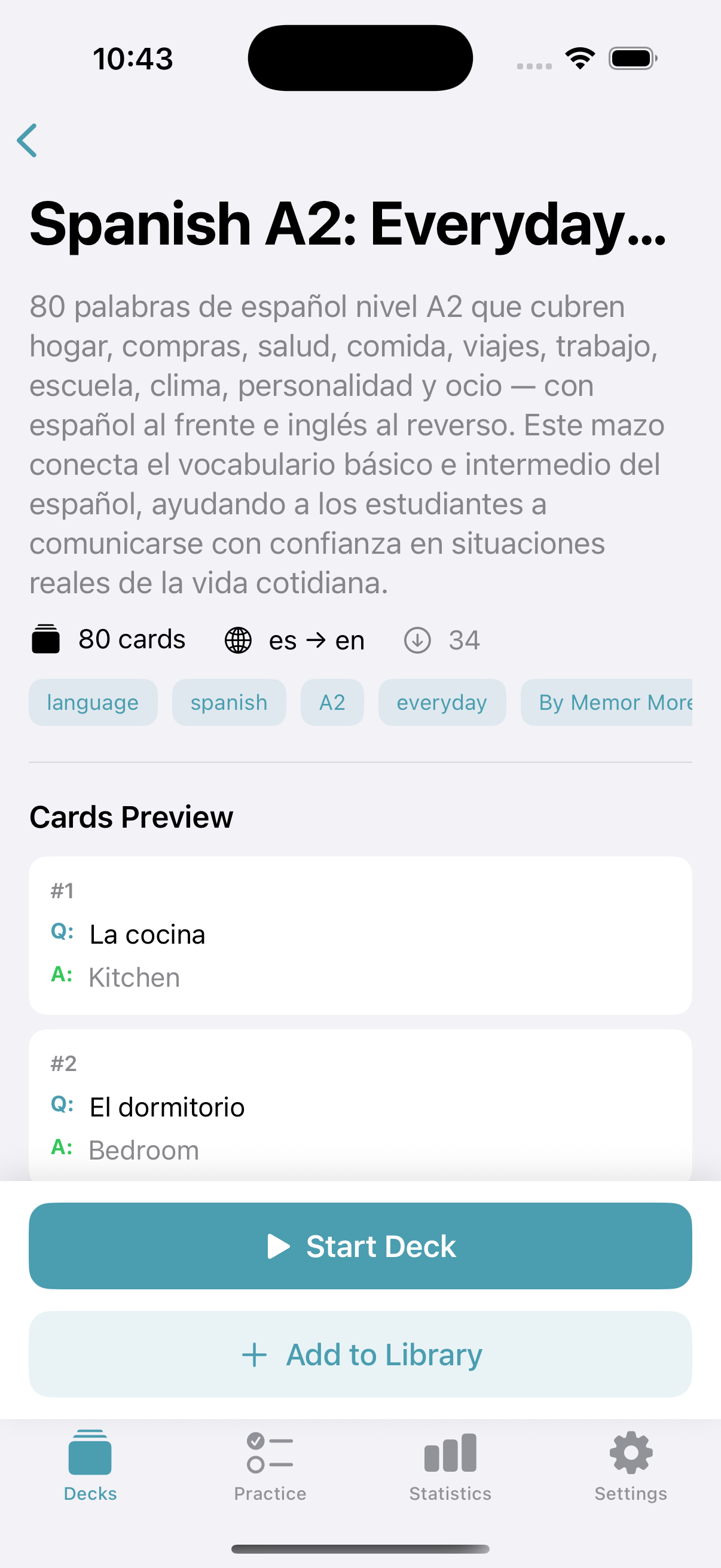
The public-deck detail used in the test. It exposes the deck description and starting action before anything is added to the library.
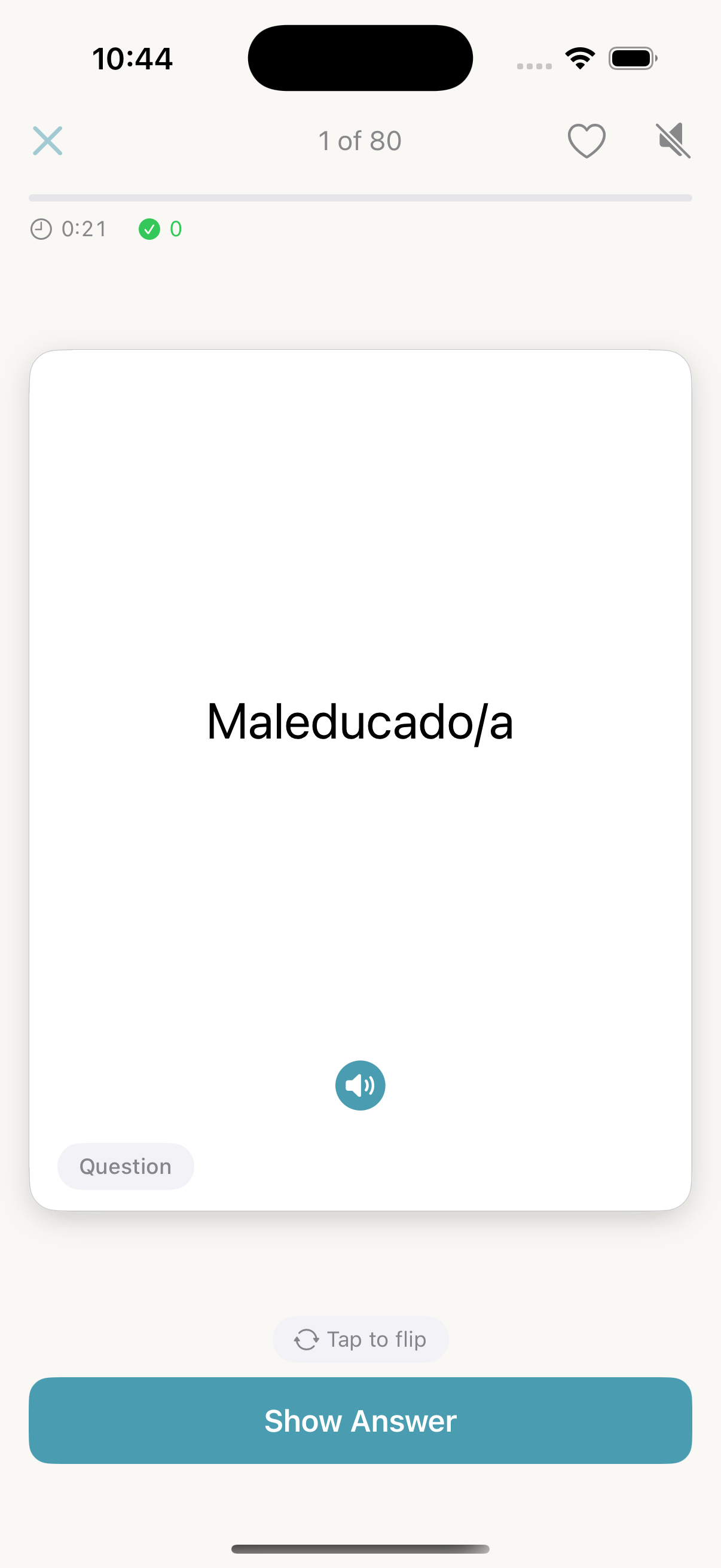
The first review prompt after the one-time introduction. We revealed the answer and rated it Good to complete the flow.
This is where Memor More's iPhone case is clearest. The home, deck catalogue and study screen use familiar iOS navigation, the core flow does not ask for an account, and Memor More now includes FSRS. The earlier tested build offered three named scheduling approaches before that availability update. The same deck can also be used for a one-minute Quiz challenge, full-term typing or generated practice exercises, depending on what you want to practise.
The smaller surface is also a limit, not an automatic virtue. Fewer controls are unhelpful when you need the control that is missing.
Where Anki is better
Choose Anki without apology when any of these is central to your work:
- You already have an important collection. Staying in Anki avoids migration uncertainty around generated cards, templates, media, tags and scheduling history.
- You rely on Anki’s particular FSRS controls. Its documented desired-retention and parameter-optimisation workflow may be important to an established collection. FSRS is available in Memor More, but compare its current controls before migrating; availability does not establish identical settings.
- You need sophisticated card construction. Cloze deletion, custom fields, conditional templates and image occlusion are real capabilities, not decoration.
- You study across non-Apple devices. Memor More has no Android app and no equivalent to the full Anki desktop clients on Windows and Linux.
- Your course depends on an established shared deck. Anki's community catalogue and long-running medicine/language workflows are materially larger.
- Your collection is very large. AnkiMobile documents 100,000-card decks. We have not benchmarked Memor More at that scale.
- You depend on desktop add-ons or self-hosted sync. Memor More provides neither an add-on system nor a documented self-hosted sync server.
Buying AnkiMobile can also be less expensive over several years than maintaining an optional subscription elsewhere. Memor More's free core may be enough for a simple workflow, but that does not make every paid comparison resolve in its favour.
Where Memor More is easier
Memor More is a fit when you want a native Apple app with several ways to learn from a deck: scheduled reviews, a one-minute word-identification challenge, full-term typing and generated practice exercises. You can create your own material, use AI to prepare editable card drafts, or discover and share decks with the community.
The practice exercises guide explains how generated sets let you work with a deck from a different perspective. These learning modes and community sharing were confirmed by the product owner on 13 September 2026; they are separate from the dated import and first-review tests above.
The native app stores study data locally and exposes iCloud status separately. Its Data Settings screen also provides whole-library export and backup import. That makes the local/cloud boundary visible, though it does not make every privacy question disappear: iCloud has its own account and service terms, while optional AI features use a separate cloud-processing path.
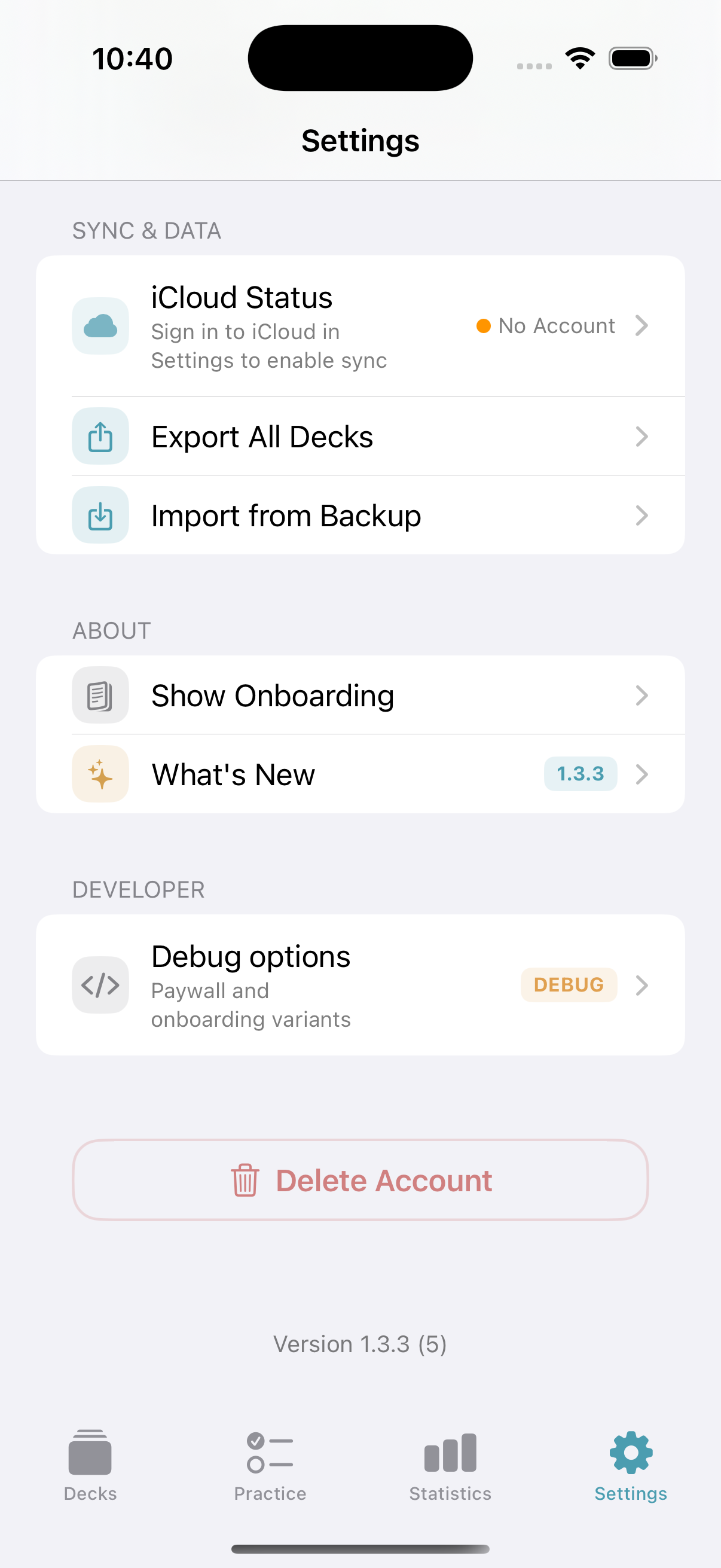
The test environment was not signed into iCloud. That verifies the visible no-iCloud state and local workflow; it does not verify a multi-device sync round trip.
For a no-account first try, start with the iPhone-specific decision page or browse public flashcard decks before installing. If you make cards from a source file, the tested AI flashcard generator workflow documents its own privacy and validation gaps rather than implying the file stays local.
The Anki migration test found a real loss
Our fixture was deliberately small enough to audit:
- note 1: bold front, italic back and one image, producing one card;
- note 2: Anki's Basic (and reversed card) note type, producing two directional cards;
- source total: two notes, three cards;
- export: Anki desktop 25.09
.apkg, with scheduling and media included; - archive SHA-256 prefix:
d9b6d7422f36(full checksum in the evidence archive).
Memor More reported “2 cards ready to import.” The generated reverse card was therefore not preserved as a third card. The importer accepted the package, but acceptance is not lossless migration.
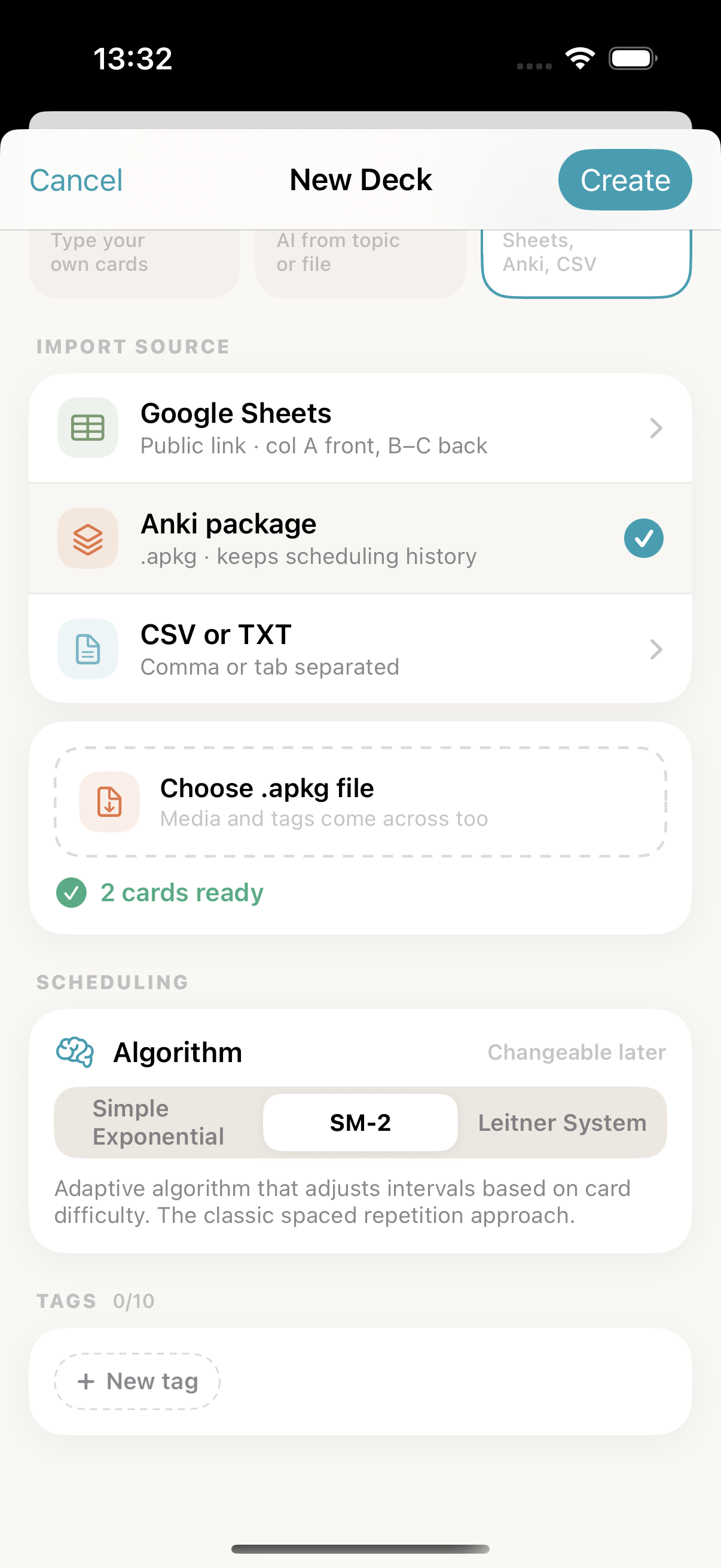
The tested screen also said an Anki package “keeps scheduling history” and that media and tags come across. We did not establish those promises in this run, and the observed card-count mismatch is enough to require caution. Before moving a real collection:
- export a copy from Anki while keeping the original untouched;
- record source note and card counts separately;
- sample every note type, especially reverse, cloze and image-occlusion models;
- compare media, formatting, tags and due dates after import;
- complete reviews in the copy before committing to a new app.
If those checks matter and cannot be repeated, remain in Anki. A migration tool should not be trusted merely because it opens the file.
Offline study, sync and privacy are three different questions
Both products can review cards stored on the phone without a connection. That is offline availability.
Sync is optional and follows different paths. Memor More uses Apple's iCloud/CloudKit for the supported native Apple devices. The Anki ecosystem normally uses AnkiWeb, and Anki documents a self-hosted sync server for people willing to operate it. Each route changes where a copy of the data exists and which account controls it.
Privacy labels are useful disclosures, not proof that a workflow is risk-free. The US listings for both apps disclosed categories of data associated with app use. Users studying confidential client, patient, employer or unpublished research material should read current privacy policies, avoid placing identifying details on cards, and confirm their institution's rules. A local review screen does not imply that every import, sync or AI action stays on that screen.
When neither product fits
Neither is ideal for real-time collaborative deck editing, teacher assignment management, handwriting-first notes, or learning dominated by long calculations and open-ended problems. For those tasks, a shared document, classroom platform, notebook or problem bank may carry the central workflow better.
Flashcards also work best when a prompt has a checkable answer. Turning a complex argument into dozens of isolated facts can make study feel productive while removing structure. Read what active recall is, then use the Feynman technique with flashcards when explanation—not only factual retrieval—is the goal.
Primary sources and reproducibility
- Official AnkiMobile US App Store listing: US price, supported devices, offline media, large-deck statement, mobile limitations and privacy label.
- Official Anki FSRS deck-options manual: FSRS availability, desired retention, parameter optimisation and compatibility notes.
- Official Anki sync manual: AnkiWeb workflow, local data and media sync.
- Official Anki export manual:
.apkg/.colpkg, media and scheduling export options. - Official Anki add-on manual: desktop add-on installation and update risk.
- Official Anki self-hosted sync manual: supported self-hosting path.
- Official Memor More US App Store listing: price, platform and privacy disclosures.
- Memor More 1.3.3 (5) direct current-build workflow and import fixture, documented in the Task 06 evidence archive in the website repository.
Change log and review ownership
| Date | Change | Evidence status |
|---|---|---|
| 9 September 2026 | Rebuilt the comparison around a dated iPhone workflow, current official sources and a controlled .apkg import | Product facts re-checked; AnkiMobile direct test remains an explicit gap |
| 9 September 2026 | Documented SM-2 as the default in tested build 1.3.3 (5) | Direct build/UI and implementation evidence |
| 13 September 2026 | Updated the scheduler comparison to show FSRS is available | Product-owner confirmation; current-release controls and defaults still need independent checking |
| 13 September 2026 | Added one-minute Quiz, full-term typing, generated Practice Sets and community deck sharing | Product-owner confirmation; no new comparative mode benchmark |
| 9 September 2026 | Added regional price language, platform definitions, migration limits, original screenshots and neither-product cases | Included in this revision |
Quarterly comparison owner: Anatolii Valeev. Next factual review due: 9 December 2026. The owner must re-check both storefronts, the current Memor More build, Anki's release/manual changes, every matrix row and every caveat. Final independent editorial approval for this revision is recorded separately in the implementation note; publication should not be treated as approved until that sign-off is present.
For the shorter iPhone decision, continue to An Anki alternative for iPhone. For other tools and their limits, see the broader spaced-repetition app comparison.
If the smaller workflow fits, try Memor More on the App Store with one non-critical deck first. Keep the source Anki collection untouched until your own card-count, formatting, media and schedule checks pass. App Store clicks from this article are tracked with the article slug; no study content is included in the event.
Written by
Founder & developer of Memor More. I build iOS and Mac apps and write about the science of memory and learning. @Jerelii on X